
사무실
사무실은 프로젝트의 에이전트들을 3D 방에서 일하는 로봇으로 보여 주는 화면입니다. 로봇은 에이전트가 지금 하는 일에 따라 방 안을 오가고, 승인 요청은 그 로봇 머리 위에서 바로 답합니다. 모든 프로젝트는 한 건물의 방들입니다.
PC 프로그램 0.2.31부터 됩니다.
사무실 열기
프로젝트 화면 오른쪽 위의 조직도 | 사무실에서 사무실을 누릅니다. 고른 화면은 브라우저에 기억되어 다음에도 그 화면으로 열립니다.
- 전체 에이전트 탭에서는 건물이, 프로젝트 탭에서는 그 프로젝트의 사무실이 열립니다.
- 사무실은 창 아래 끝까지 채우고, 페이지는 스크롤되지 않습니다.
- 끌어서 이동하고, 휠이나 왼쪽 위의 − / +로 확대합니다. 배율을 누르면 사무실 전체가 다시 보입니다.
- 3D 그림(three.js)은 사무실을 처음 열 때 불러옵니다. 휴대폰 앱으로는 보내지 않습니다.
건물
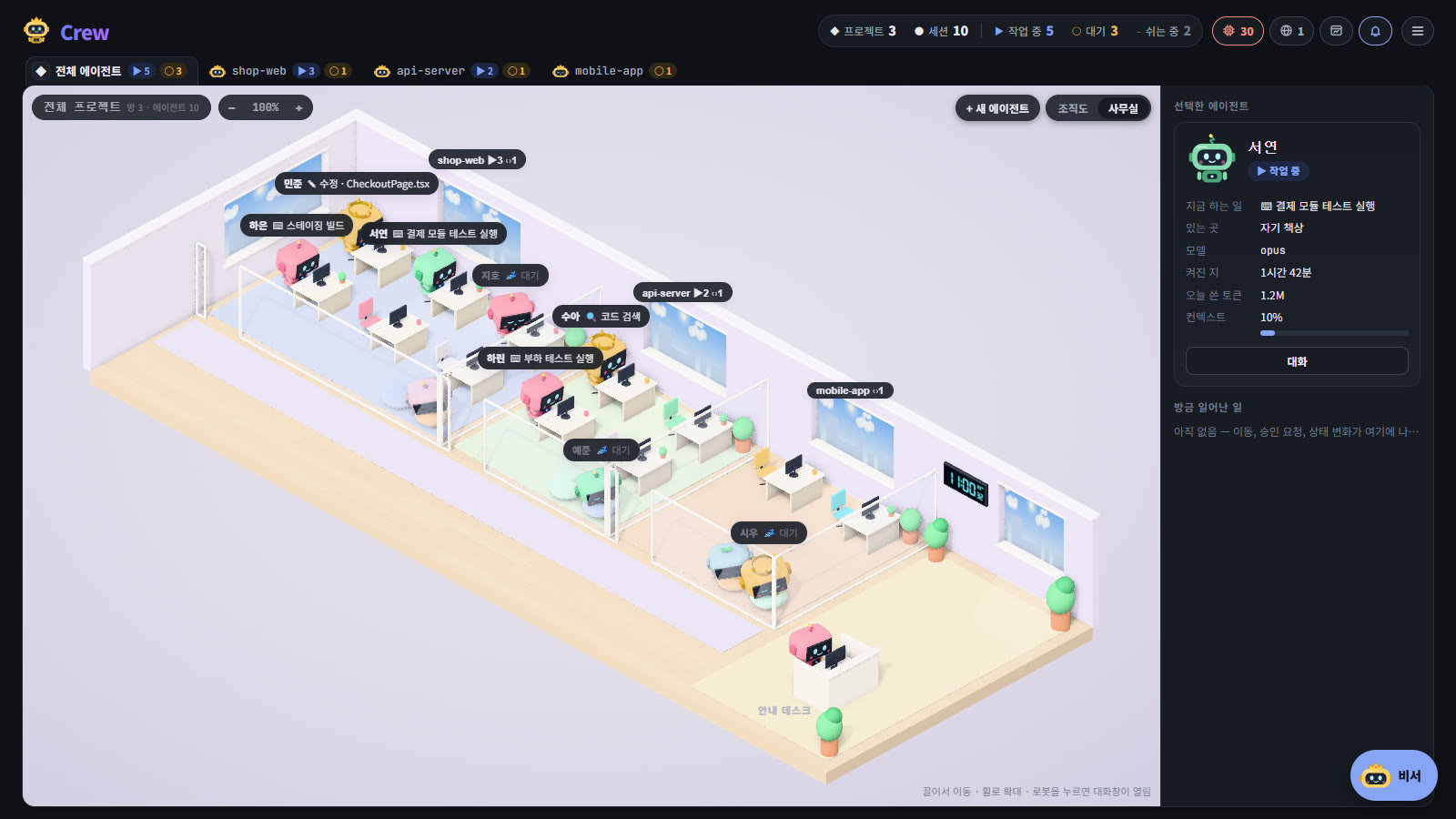
전체 에이전트 탭의 사무실은 건물입니다. 프로젝트마다 복도에 면한 유리벽 방이 하나씩 있고, 방 안에서 그 프로젝트의 로봇들이 일합니다.
- 방은 팀 인원에 맞춰 커지고, 프로젝트가 넷을 넘으면 두 번째 줄이 생깁니다.
- 방 위의 이름에는 일하는 수와 기다리는 수가 붙습니다. 방을 누르면 그 프로젝트의 사무실로 들어갑니다.
- 로비 안내 데스크에는 비서가 앉아 있습니다.
프로젝트 사무실
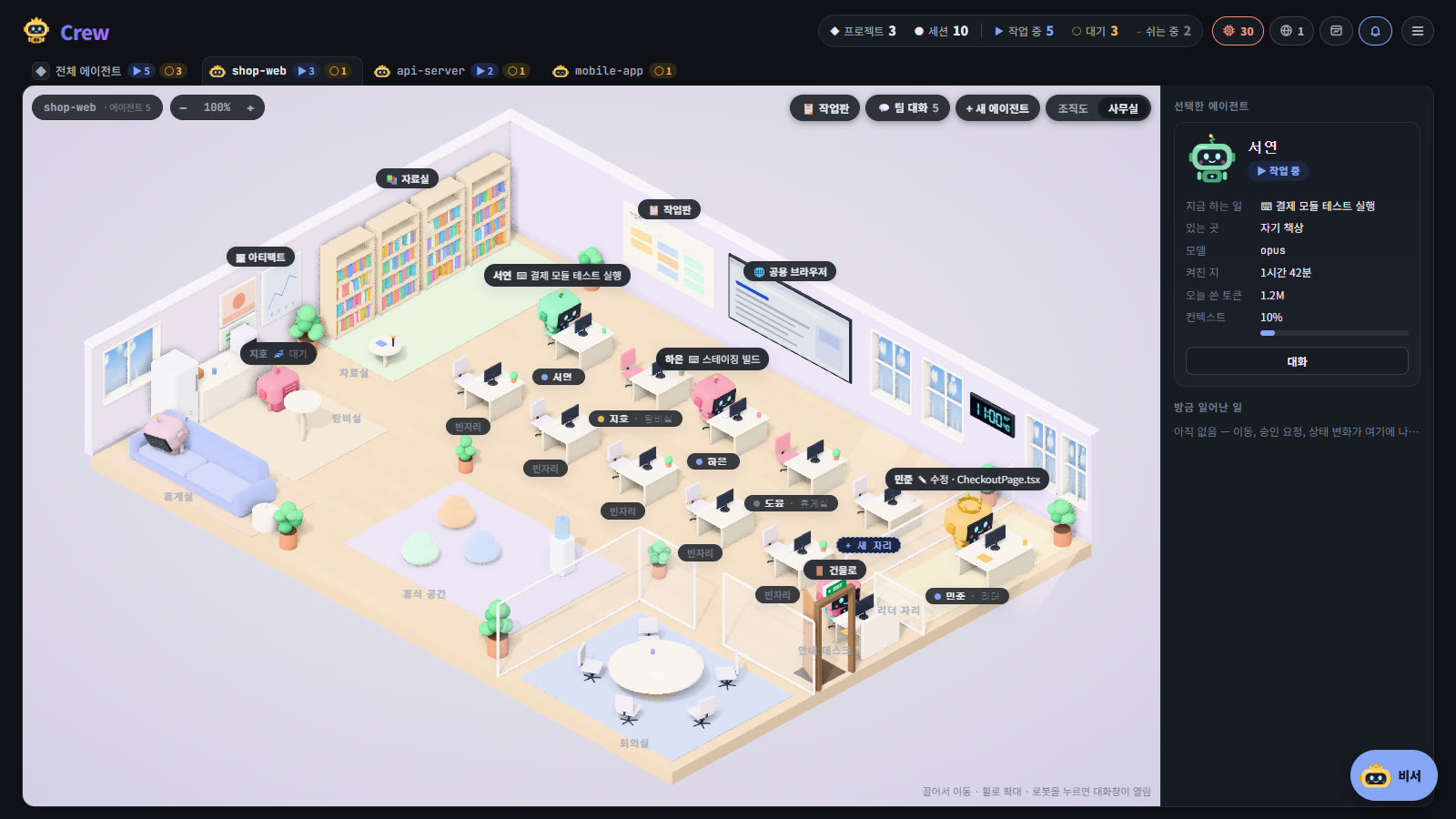
에이전트마다 자기 색의 책상이 있습니다. 왕관을 쓴 리더는 창가의 리더 자리에 앉습니다. 책상 줄은 팀 인원에 맞춰 늘어나고, 늘 한 자리는 새 자리로 비어 있어 누르면 새 에이전트를 띄웁니다.
로봇은 에이전트가 하는 일에 따라 자리를 옮깁니다.
| 파일 읽기, 검색 | 자료실 책장으로 갑니다. |
|---|---|
| 웹 보기 | 벽의 공용 브라우저 화면 앞으로 갑니다. |
| 다른 에이전트에게 메시지 | 받는 에이전트의 자리(리더면 리더 자리)로 갑니다. |
| 그 밖의 일 | 자기 책상에서 타이핑합니다. 머리 위에 지금 하는 일이 나옵니다. |
| 승인 요청 | 자기 책상에서 손을 들고 기다리고, 머리 위에 요청 말풍선이 뜹니다. |
| 입력 대기 | 책상에서 졸다가 1분이 지나면 탕비실로, 5분이 지나면 휴게실 소파로 갑니다. |
| 쉬는 중(세션 끝남) | 휴게실 소파에서 흐리게 잠듭니다. |
| 서브에이전트 | 도는 동안 작은 로봇으로 책상 옆에 앉습니다. |
소파나 탕비실 같은 공용 자리는 한 자리에 한 로봇만 앉습니다. 사무실을 새로 열면 로봇은 걸어오지 않고 지금 있어야 할 자리에 바로 있습니다.
누르면
| 로봇, 이름표 | 그 에이전트의 대화창이 메시지 입력란이 준비된 채로 열립니다. |
|---|---|
| 요청 말풍선 | 그 자리에서 허용 / 거부로 답합니다. 질문처럼 고를 것이 있는 요청은 요청 창을 엽니다. |
| 벽의 작업판 | 작업판을 엽니다. |
| 공용 브라우저 화면 | 브라우저 패널을 엽니다. |
| 벽의 아티팩트 액자 | 아티팩트 창을 엽니다. |
| 자료실 책장(위의 표지판) | 자료실을 엽니다. |
| 안내 데스크 옆 문(건물로) | 건물로 나갑니다. |
오른쪽 패널
사무실 오른쪽에는 로봇을 누르면 그 에이전트가 나옵니다: 지금 하는 일, 있는 곳, 모델, 켜진 지, 오늘 쓴 토큰, 컨텍스트, 요청이 있으면 허용 / 거부, 그리고 대화 버튼. 그 아래 방금 일어난 일에는 이동, 승인 요청, 상태 변화, 서브에이전트 시작과 끝이 시각과 함께 쌓입니다. 창이 좁으면 패널은 숨겨집니다.
작업판과 팀 대화
사무실 오른쪽 위의 작업판과 팀 대화는 페이지 위에 창으로 열립니다. 위쪽 탭으로 둘을 오가고, Esc로 닫습니다. 작업판에 쓰던 내용은 닫아도 그대로 남습니다.
- 창의 왼쪽 가장자리를 끌면 넓어집니다(작업판 열이 더 보임). 가장자리를 더블클릭하면 원래 너비로 돌아갑니다.
- 같은 줄의 새 에이전트로 이 프로젝트에 에이전트를 띄웁니다.
- 작업판과 팀 대화 자체는 작업판과 팀 대화를 보세요.
자료실
자료실 책장을 누르면 작업판, 팀 대화 옆에 자료실 탭이 열리고 프로젝트의 작업 폴더를 둘러볼 수 있습니다.
- 왼쪽에서 폴더로 들어가고, 파일을 누르면 오른쪽에 내용이 나옵니다. 텍스트와 그림은 바로 보이고(앞 256KB까지), 웹 페이지와 PDF는 아티팩트 창에서 열기로 엽니다.
- 폴더에서 보기는 파일 탐색기(Mac은 Finder)에서 그 위치를 엽니다.
- 읽기만 합니다. 프로젝트 폴더 밖으로는 나가지 않으며, 폴더 밖을 가리키는 링크도 따라가지 않습니다.
.env, 키 파일 같은 비밀 정보 파일은 내용을 읽지 않습니다.
비서
비서는 건물 로비의 안내 데스크에, 프로젝트 사무실에서는 입구 옆 작은 데스크에 앉아 있습니다. 비서가 어떤 에이전트에게 메시지를 보내거나, 대화를 살펴보거나, 요청에 답하는 동안에는 그 에이전트 자리로 걸어갔다가 돌아옵니다. 비서를 누르면 비서와의 대화가 열립니다.
시간과 날씨
사무실의 빛은 페이지 테마가 아니라 이 PC의 시각을 따릅니다. 새벽, 아침, 한낮, 오후, 노을, 저녁, 밤으로 방의 색, 창밖 하늘(해, 달, 별, 구름, 밤의 도시 불빛), 바닥에 드는 햇빛이 천천히 바뀝니다.
- 벽의 디지털 시계(건물에서는 로비 벽)에 지금 시각과 바깥 기온이 나옵니다.
- 날씨도 실제 날씨입니다. 구름, 흐린 하늘, 안개, 비와 눈, 뇌우의 번개가 사무실 전체에 보이고, 햇빛도 그만큼 약해집니다.
날씨는 이 PC가 Open-Meteo(키 없는 무료 날씨 서비스)에 직접 묻습니다. 위치는 Windows 위치 서비스가 켜져 있으면 그 좌표를 약 10km 단위로 반올림한 값만 보내고(정확한 위치는 PC를 떠나지 않음, 1시간마다 다시 확인), 꺼져 있거나 Mac이면 PC 시간대 이름의 도시(예: Asia/Seoul → Seoul)를 씁니다. 날씨는 20분에 한 번까지만 묻고 메모리에만 둡니다. ELOP Crew 서버에는 아무것도 보내지 않습니다.
사무실이 보이지 않으면
- 사무실 보기에는 WebGL 이 필요한데, 이 브라우저에서 꺼져 있습니다가 나오면 브라우저(또는 그래픽 드라이버)의 하드웨어 가속을 켜세요.
- 사무실이 무겁게 느껴지면 조직도로 돌아가면 됩니다. 사무실을 열지 않으면 3D 그림은 불러오지 않습니다.
The office
The office shows a project's agents as robots at work in a 3D room. A robot moves about the room with what its agent is doing, and a request is answered over its head. Every project is a room of one building.
From ELOP Crew 0.2.31.
Opening the office
Press Office in Org chart | Office at the top right of a project. The browser remembers your pick and opens that view next time.
- On the All agents tab it opens the building; on a project's tab, that project's office.
- The office fills the window to its bottom edge, with no page scroll.
- Drag to move; zoom with the wheel or − / + at the top left. Press the zoom level to see the whole office again.
- Its 3D drawing (three.js) loads the first time the office opens. It is never sent to the phone app.
The building
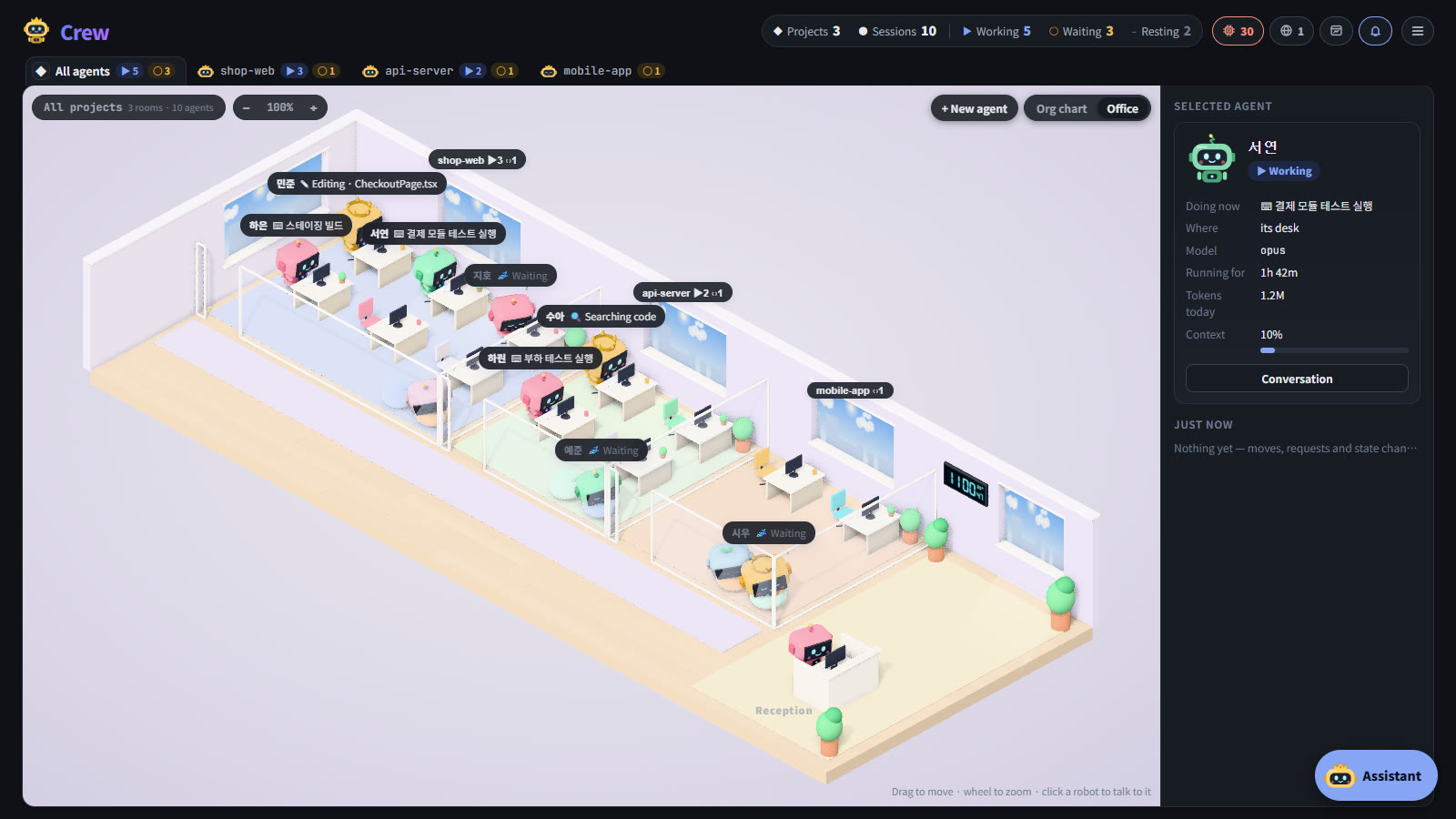
On the All agents tab the office is a building: a glass-fronted room off one corridor for each project, its robots at work inside.
- A room grows with its crew, and past four projects a second row begins.
- The name over a room shows how many are working and waiting. Press a room to go into that project's office.
- The assistant sits at the lobby's reception desk.
A project's office
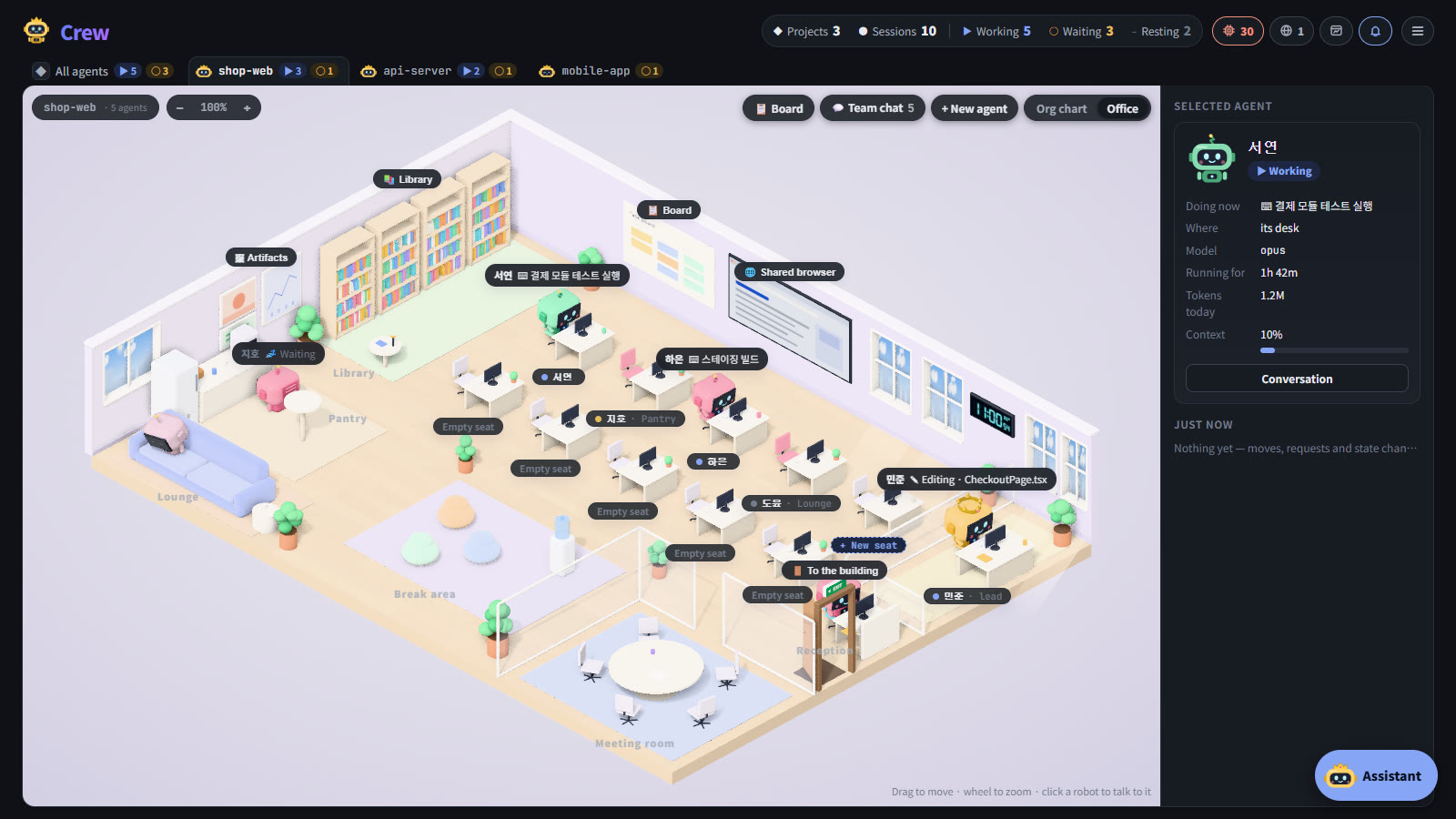
Each agent has a desk in its colour; the leader, with a crown, sits at the lead's desk by the window. The rows of desks grow with the crew, and one is always free as a New seat: press it to start a new agent.
A robot goes where its agent's work takes it.
| Reading, searching | To the library's bookcases. |
|---|---|
| The web | To the shared browser's screen on the wall. |
| A message to another agent | To that agent's desk (the lead's desk for the leader). |
| Anything else | Typing at its desk, what it does shown over its head. |
| A permission request | Waits at its desk with a hand up, a request bubble over its head. |
| Waiting for input | Dozes at its desk, goes to the pantry after a minute and to the lounge sofa after five. |
| Resting (session over) | Sleeps on the lounge sofa, greyed. |
| Subagents | Small robots by its desk while they run. |
A shared place such as a sofa seat or the pantry takes one robot. An office opened afresh shows each robot where it already is, without the walk.
What a click does
| A robot, its label | Opens that agent's conversation with the message box ready. |
|---|---|
| A request bubble | Answers it there with Allow / Deny; a request with choices, such as a question, opens its window. |
| The board on the wall | Opens the board. |
| The shared browser's screen | Opens the Browsers panel. |
| The artifacts on the wall | Opens Artifacts. |
| The library's bookcases (or the sign over them) | Opens the library. |
| The door by reception (To the building) | Goes out to the building. |
The panel on the right
Press a robot and the panel at the office's right shows its agent: what it is doing, where it is, the model, how long it has run, today's tokens, its context, Allow / Deny for a request, and Conversation. Under it, Just now lists moves, requests, state changes and subagents starting and ending, with their times. In a narrow window the panel is hidden.
The board and team chat
Board and Team chat at the office's top right open in a window over the page. Its tabs switch between them, and Esc closes it; what you were typing on the board stays.
- Drag the window's left edge to widen it (more board columns); double-click the edge for the usual width.
- New agent in the same row starts an agent in this project.
- For the board and team chat themselves, see The board and team chat.
The library
Press the library's bookcases for a Library tab beside the board and team chat: the project's working folder, to look through.
- Go into folders on the left; press a file to see it on the right. Text and pictures show there (the first 256 KB); a web page or a PDF opens with Open in Artifacts.
- Show in folder opens its place in File Explorer (Finder on a Mac).
- It only reads, never goes above the project's folder, and does not follow links out of it.
- The contents of secrets such as
.envand key files are never read.
The assistant
The assistant sits at the reception desk in the building's lobby, and at a small desk by the way in of a project's office. While it works on an agent (a message, a look at its conversation, an answer to its request) it walks to that agent's desk, then back. Press it to open its chat.
The hours and the weather
The office's light follows this PC's local time, not the page's theme: dawn, morning, noon, afternoon, the sunset, evening and night, each easing into the next in the room's colours, the sky in the windows (sun, moon, stars, clouds, the city lit at night) and the sunlight on the floor.
- A digital clock on the wall (the lobby's, in the building) shows the time and the temperature outside.
- The weather is real too: clouds, an overcast sky, fog, rain and snow, lightning in a storm, over the whole office, with the sunlight as strong as they leave it.
This PC asks Open-Meteo (a free weather service, no key) for the weather itself. With Windows' location service on, only its position rounded to about 10 km is sent (the precise spot never leaves the PC; checked again each hour); with it off, or on a Mac, the city in the PC's time zone name (Asia/Seoul → Seoul) is used. The weather is asked at most every 20 minutes and kept in memory only. Nothing is sent to the ELOP Crew server.
If the office does not show
- The office needs WebGL, which this browser has turned off: turn on hardware acceleration in the browser (or update the graphics driver).
- If the office feels heavy, go back to Org chart: the 3D drawing is not loaded unless the office is opened.